
If you’re considering a self-guided adventure along California’s famous Pacific Coast Highway, the Smartphone Driving Tour between Santa Maria & Monterey might catch your eye. Designed to give you a flexible way to explore some of the most scenic spots, this tour offers a unique blend of autonomy and guided commentary.
While it’s not perfect, it could be a good fit for travelers who appreciate the freedom to explore at their own pace without breaking the bank.
We like that you can start anywhere along the route between Santa Maria and Monterey, making it adaptable whether you’re coming from the south or heading north. Plus, the price—just under $12 for a group of up to 15—makes it accessible for a wide range of travelers. Another highlight is the focus on providing a historical overview and information about local attractions, which can add some context to your drive.
However, a notable downside is the reported difficulty with navigation and app usability, which might require a tech-savvy passenger.
If you’re someone who values storytelling over a perfectly orchestrated tour, and you’re comfortable with using your phone without constant guidance, this could be worth trying. Those who prefer a more traditional, guided bus tour might find this format a little limiting.
It’s especially suited to independent travelers or groups who don’t mind a bit of a tech challenge in exchange for the freedom to explore on their own schedule.
Key Points
 1 / 4
1 / 4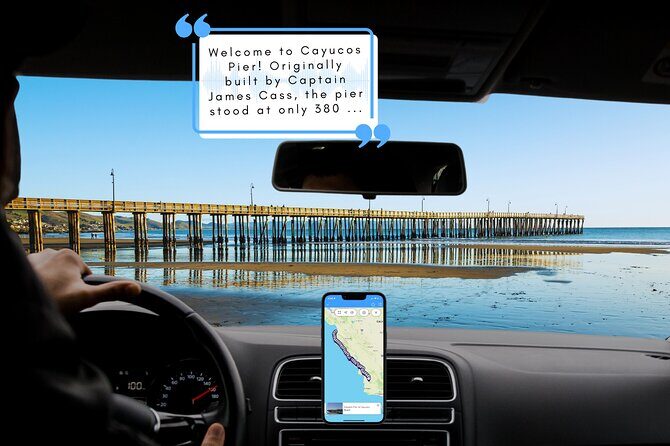 2 / 4
2 / 4 3 / 4
3 / 4 4 / 4
4 / 4- Affordable option: Cost is just $11.99 per group, making it a budget-friendly way to explore key sights.
- Flexible scheduling: No fixed start or end time; you can enjoy the tour at your own pace.
- Self-guided but connected: Connect your phone to your vehicle’s stereo for a hands-free experience.
- Coverage of must-see sights: Includes iconic stops like Bixby Bridge, Morro Rock, and Hearst Castle.
- Potential navigation issues: Reviewers mention the directions aren’t very user-friendly, especially while driving.
- No data needed during the tour: After the initial download, you can enjoy the commentary without signal.
A detailed look at what this tour offers
This smartphone-guided drive is designed to transform your journey along the Pacific Coast Highway into an engaging experience, delivering narration about the area’s highlights, history, and culture. The idea is straightforward: connect your phone to your car’s stereo, follow the suggested route, and enjoy the commentary as you go. Since there are no time constraints, you can stop wherever you want, explore, take photos, or linger longer at spots that catch your eye.
You can also read our reviews of more tours and experiences in Pismo Beach

The route and stops
The tour begins at the Valley Pacific Travel Center in Santa Maria, a practical starting point if you’re coming from the south. From there, the route takes you along the scenic Highway 101, passing the breathtaking Bixby Bridge—an absolute must-see if you’re driving this stretch. The bridge’s sweeping arch offers photo ops, and many find it a highlight of the drive. The tour continues northward through the coast’s iconic landscape, with stops at Morro Rock, a distinctive volcanic plug that dominates the shoreline.
Further along, you’ll pass through San Luis Obispo, famous for Bubblegum Alley, where the walls are covered in decades of chewed gum—quirky and memorable. The route also includes a visit to the historic Hearst Castle, known for its opulence and Hollywood connections, although the tour notes that access may be seasonal or subject to availability.
The final point is Monterey, where the route ends in the Monterey Salines Highway area. Keep in mind, you can start anywhere along the route, making this flexible for any point of departure or return.
The actual experience
Most of the narration provides interesting insights into the sights, with some fun trivia questions sprinkled in, which can make the drive more interactive. We’ve seen feedback indicating that the commentary is engaging, but others mention the dialogue can sometimes feel a little cheesy. Still, it’s a fun way to learn about the area without reading a guidebook.
Navigation and usability
A key challenge reported by users is navigation difficulty. The directions are not the most intuitive, and drivers have found it tricky to manipulate the app while on the road. It’s clear that having a passenger who’s comfortable with smartphone tech can make this much smoother. The instructions are not overly detailed or visual, which might lead to confusion, especially if you’re trying to keep your eyes on the road and your hands on the wheel.
One reviewer even pointed out that the download link was not working for them, and they had to book directly from the vendor’s website, which caused a bit of frustration. So, be prepared to troubleshoot or contact customer support if you face issues with getting the app set up.
The value for the price
At just under $12, the main value here is the content and flexibility rather than a fully guided tour with a driver or guide. For groups or travelers who are comfortable using their phones and enjoy a DIY approach, this can be a cost-effective way to get a structured experience. But if you’re used to highly navigated day trips, the navigation hiccups might feel limiting.



Who should consider this tour?
This experience is best suited for independent travelers comfortable with technology, who value flexibility over a rigid schedule. If you’re traveling in a group or with friends who can handle a bit of app troubleshooting, you’ll likely find it a fun way to learn about the sights while enjoying the drive.
It’s also good for those on a budget, as the cost is low and there’s no extra fee for attraction tickets or guides. However, if you prefer a more seamless, navigationally reliable tour, or if you’re not comfortable using an app while driving, you might want to look elsewhere or consider a more traditional guided experience.
The Sum Up
This Smartphone Driving Tour offers a novel way to explore California’s stunning coast, especially if you enjoy creating your own itinerary and learning interesting tidbits along the way. It’s priced attractively and doesn’t tie you down to specific times, giving you the freedom to linger at beautiful spots or skip ahead.
However, the navigation issues can be a real sticking point, and the overall experience hinges on how comfortable you are with using your phone while on the road. For tech-savvy travelers who don’t mind a bit of troubleshooting, this could be a budget-friendly addition to your Big Sur adventure.
While it may not be the most polished or foolproof option, the content and flexibility make it worth considering if you’re looking for a self-guided, economical way to see some of California’s most iconic sights.
Smartphone Driving Tour between Santa Maria & Monterey ‘Big Sur’
FAQ
Is this tour suitable for families or children?
This tour is primarily a self-guided driving experience. There are no specific age restrictions mentioned, but consider your children’s comfort with long drives and using a phone app. If your kids enjoy scenic road trips and trivia, they might find it engaging.
Do I need a data connection during the tour?
No. The app only requires a good mobile or WiFi connection to download initially. Once downloaded, no signal or data is needed during the actual driving.
Can I start the tour anywhere along the route?
Yes. You can begin at any point between Santa Maria and Monterey. The start point mentioned is the Valley Pacific Travel Center in Santa Maria, but flexibility is built into the experience.
How long does the tour take?
The estimated duration is around 4 to 5 hours, but since there are no strict time constraints, you can take longer if you want to explore more or stop more often.
What are the main attractions covered?
Expect to see the Bixby Bridge, Morro Rock, Bubblegum Alley, and Hearst Castle (season permitting). The narration also covers local history and points out recreation areas and parks.
Is this a private tour?
Yes. Only your group will participate, which allows for a tailored experience, but it also means you are responsible for navigation.
What if I have issues with the app or download?
Some users have experienced problems like non-functioning links. It’s advisable to contact the provider’s customer support if issues arise, and ensure your device and connection are ready beforehand.
If you’re a traveler who enjoys DIY adventures and appreciates the flexibility of exploring at your pace, this smartphone-guided drive could be a fun, budget-friendly way to see California’s stunning coast. Just be prepared for some tech quirks, and keep your passenger(s) handy to help with navigation.